
How to remove an external breedfile from .pet file / How to swap a breedfile in .pet file
Materials and Method
- hex editor - I dowloaded HxD
- PetzByte Checksum Calculator (Yabiko, make sure it works, if you have any trouble check TeddiDursa's tut on - PetzU)
- Hex Calculator https://www.calculator.net/hex-calculator.html
- Your .pet file (make sure to backup your file, just to be sure!!)
My example pet for this tutorial is Dot, a Border Collie that I am going to change to a CK Border Collie.
Step 1: check the breedfile(s) the pet currently is, and the breedfile(s) you would want your pet to be. We need to count how many characters the breedfile name has (keep in mind: spaces between words do count!) and what the breed ID is, and then note the difference (if any). You can find this info if you open the breedfile in LNZ and go to RCData.
Example: Border Collie - 13 characters, Breed ID: E203 CK Border Collie - 16 characters, Breed ID: C807 There's a difference of 3 characters between the breeds
Step 2: Create a copy of your .pet just for safety. I copied mine to my desktop.
Step 3: Open your pet in the hex editor
Step 4: Now search for 'Border Collie' (the current breedfile your pet is) in the file. There are 10 results, but we are only gonna be editing the first three
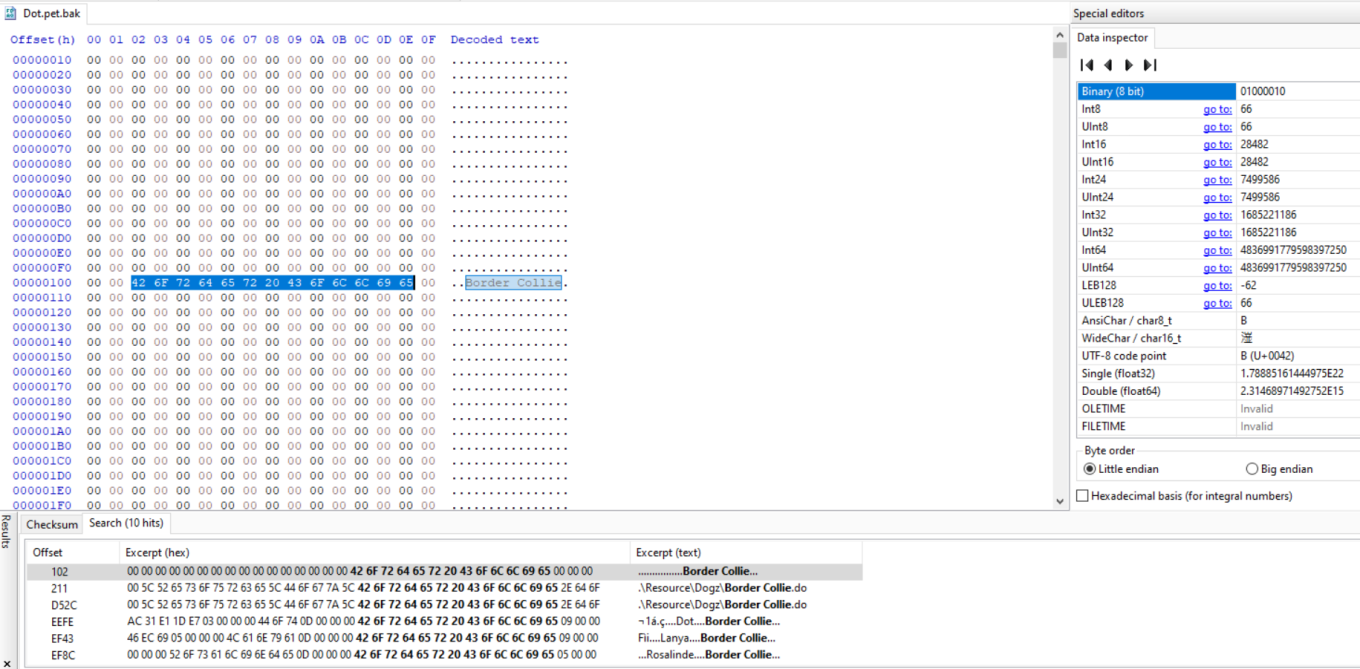
Step 5: For the first result, just type the new breedname, in this example CK Border Collie. For the second result, type CK Border Collie.dog
Step 6: The third one, this one, is a little trickier. When we start typing, we need to make sure it doesn't overwrite the other bytes. Because the new breedname is 3 bytes longer, go to 'edit', 'insert bytes' and put 3. Now you have more space in the name and the breedname should fit there. What if the breedname you want is shorter than the current one? Just remove the excess characters. The hex editor will yell at you to be sure, but just click ok.

Step 7: We are now going to replace the breedfile ID. See the E2 03? We are going to replace it with the ID from the CK file, C8 07.

Step 8: Because it's easier to do now, we are also going to change the 20 that's next to the breed ID. You will need to check in the hex calculator what the new number should be. In this case, 20 + 3 = 23. 3 because that is the difference of bytes between the names. If your breedname has less characters than the old one, subtract the difference!
Step 9: go to 'search', ‘hex-values’ and replace all the old IDs to the new ID's. This is the point where the hex editor yells at me that the ‘index is out of bounds’. I just click ok, but for me it just keeps coming back. Luckily, we have edited everything we needed so we can just save and close the program.
Step 10: Run PetzByte to recalculate your petz checksum
Step 11: Remove the external breedfiles from the game you no longer need and see if you can take out your pet!
Log in to post a comment.
Comments
No comments yet. Be the first to say something!